Physical Address
42°26′05″N 83°59′06″W
Physical Address
42°26′05″N 83°59′06″W
Email infrastructure is one of the most complex yet fundamental services on the internet. Despite using email daily, most people—even many in tech—don’t understand how it actually works under the hood. SMTP, IMAP, DKIM, SPF, DMARC, spam filtering, TLS encryption, mail queues, DNS configurations… the list of interacting components is extensive.
This project aims to build a production-grade email server from scratch, not as a quick setup following a tutorial, but as a deep dive into email security, protocols, and infrastructure management. The goals are threefold:
The server will host email for secblues.com, providing a professional email address for professional and blog correspondence. This is real-world usage with real consequences if misconfigured—which makes it an excellent learning opportunity.
It’s a fair question. Commercial email services like Google Workspace, Fastmail, and ProtonMail are reliable, secure, and cost-effective. Why take on the complexity of self-hosting?
The answer: learning. Running your own mail server teaches you:
These are skills that translate directly to security operations, DevOps, and systems administration roles. You can’t learn them by using Gmail.
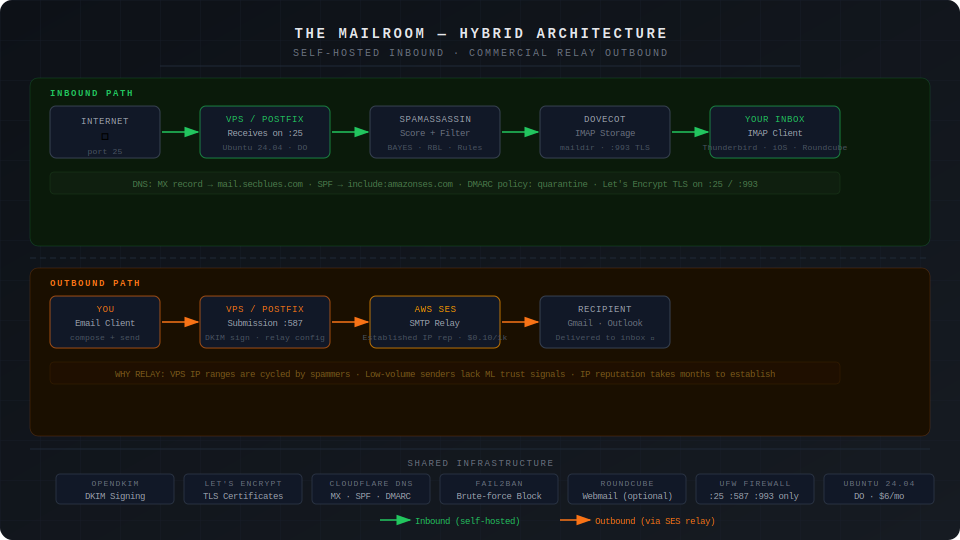
For this project, I’m deploying a hybrid architecture using DigitalOcean for hosting with AWS SES for outbound email relay. This combines self-hosted infrastructure for learning with commercial relay for reliable delivery.
Why hybrid instead of pure self-hosted?
The harsh reality of email reputation: even with perfect configuration (SPF, DKIM, DMARC, PTR records), small mail servers face two massive obstacles:
Building IP reputation takes months of consistent sending, and even then, there are no guarantees. For job applications and professional correspondence, this risk is unacceptable.
The hybrid solution:
Inbound (full learning experience):
  Internet → Your VPS (Postfix receives on port 25)
           → Spam filtering (SpamAssassin)
           → Storage (Dovecot/IMAP)
           → You (email clients via IMAP)

Outbound (reliable delivery):
  You → Your VPS (Postfix on port 587)
      → SMTP Relay (AWS SES)
      → Recipient (delivered from established IP)
What you still learn:
What you outsource:
The deployment will run on Ubuntu 24.04 VPS with the following stack:
Now let’s examine why each of these components was chosen over alternatives.
Building a mail server requires choosing between multiple competing implementations for each role. Here’s the decision-making process for each component, with comparisons to alternatives.
Role: The MTA is the core of any mail server. It accepts incoming mail on port 25, sends outgoing mail to other servers, manages mail queues, and routes messages to local delivery agents.
Homepage: https://www.postfix.org/
Postfix is the industry-standard MTA, originally written by Wietse Venema in the late 1990s as a secure alternative to Sendmail. It’s designed with security as the primary concern—the entire architecture is built around privilege separation and defense in depth.
Why Postfix:
Logging and troubleshooting: Postfix has exceptional logging. Every mail transaction is logged with clear, parseable messages that make troubleshooting straightforward. For a learning project, this is invaluable.
| MTA | Pros | Cons | Best For |
|---|---|---|---|
| Exim (https://www.exim.org/) | Actively maintained, default on Debian, extremely flexible routing rules, powerful ACL system | More complex configuration syntax, historically more CVEs than Postfix, smaller community than Postfix | Environments with complex routing requirements, existing Debian infrastructure, or when you need Exim-specific features |
| OpenSMTPD (https://www.opensmtpd.org/) | Clean simple configuration, OpenBSD project (security-focused), minimal attack surface, modern codebase | Smaller ecosystem, fewer third-party integrations, less common in enterprise, steeper learning curve for advanced features | Minimalist setups, OpenBSD environments, security-focused deployments where simplicity matters more than ecosystem |
Verdict: Postfix offers the best balance of security, documentation, industry relevance, and learning value. Exim is a solid alternative if you’re already in Debian ecosystem. OpenSMTPD is interesting for security purists but has less industry adoption. The skills you develop configuring Postfix transfer directly to most professional environments.
Role: While the MTA handles mail transport, users need a way to access their mailboxes. The IMAP server stores mail and provides access for email clients (phones, desktop apps, webmail).
Homepage: https://www.dovecot.org/
Dovecot is the de facto standard IMAP/POP3 server, designed specifically for high performance and security. It pairs naturally with Postfix—the two projects evolved together and are commonly deployed as a matched set.
Why Dovecot:
Learning value: Understanding Dovecot teaches you how email storage works, authentication mechanisms, and the IMAP protocol’s capabilities and limitations.
| IMAP Server | Pros | Cons | Best For |
|---|---|---|---|
| Cyrus IMAP (https://www.cyrusimap.org/) | Actively maintained, extremely scalable, “murder” clustering for large deployments, robust access controls, battle-tested at scale | Complex setup, steeper learning curve, database-backed storage required, significant overhead for small deployments | Large organizations (universities, enterprises), deployments with thousands of users, when you need clustering and high availability |
Verdict: Dovecot is the clear choice for modern mail servers under 1000 users. It’s what you’ll encounter in most professional environments, and the Postfix+Dovecot pairing is well-tested and extensively documented. Cyrus is only worth considering if you’re building infrastructure for a large organization or need specific enterprise features like clustering.
Role: Spam filtering analyzes incoming mail and determines whether it’s legitimate or junk. This is critical for both usability (clean inbox) and security (blocking phishing attempts).
Homepage: https://spamassassin.apache.org/
SpamAssassin is a mature, rule-based spam filter that scores emails based on hundreds of heuristics. It’s been the standard open-source spam solution since 2001.
Why SpamAssassin:
Example scoring output:
X-Spam-Status: Yes, score=8.2 required=5.0
  tests=BAYES_99,HTML_MESSAGE,MIME_HTML_ONLY,RCVD_IN_BRBL_LASTEXT,
  RCVD_IN_XBL,URIBL_BLACK
You can see exactly why the mail was flagged (HTML-only, blacklisted sender IP, URL in known spam database).
Homepage: https://rspamd.com/
rspamd is the modern alternative to SpamAssassin—faster, more accurate, and feature-rich.
Why rspamd:
Tradeoff: rspamd is less transparent about scoring. It works better but teaches you less about spam detection techniques.
| Spam Filter | Pros | Cons | Best For |
|---|---|---|---|
| rspamd (https://rspamd.com/) | Modern architecture, significantly faster than SpamAssassin, machine learning and neural networks, integrated features (DKIM, ARC, reputation, greylisting), event-driven asynchronous design, uses Redis for caching | Steeper learning curve, less transparent scoring (ML models are “black boxes”), requires Redis infrastructure, more complex initial setup | Production deployments prioritizing performance and accuracy, high-volume mail servers, when you want an all-in-one solution |
| MailScanner (https://www.mailscanner.info/) | Mature and battle-tested, integrates multiple scanners (SpamAssassin, ClamAV), flexible policy framework, good for corporate environments | Heavier resource usage, slower processing than modern alternatives, Perl-based (performance limitations), smaller active community | Corporate environments needing policy-based routing, deployments requiring virus scanning integration, when you need centralized mail gateway |
Recommendation for this project: Start with SpamAssassin to learn spam filtering fundamentals. The transparent scoring teaches you how spam detection actually works – you can see exactly which rules triggered and why. After understanding the principles, consider migrating to rspamd for better performance.
Article angle: Document both. Show SpamAssassin setup and detailed rule analysis, then migration to rspamd, explaining what you learned from each approach.
Role: DKIM (DomainKeys Identified Mail) cryptographically signs outbound email, allowing recipients to verify the message came from your domain and wasn’t altered in transit.
Homepage: http://www.opendkim.org/
OpenDKIM is the standard open-source implementation of DKIM signing and verification.
Why OpenDKIM:
How it works: OpenDKIM signs outgoing mail with your private key, and publishes your public key in DNS. Recipients verify the signature using the public key, confirming the mail came from your domain.
The reality is that OpenDKIM is the standard implementation. The only alternative worth mentioning:
Verdict: Use OpenDKIM if running the Postfix+SpamAssassin stack. If you’re using rspamd, use its built-in DKIM functionality to keep your architecture simpler.
Role: Accepts mail from your server and delivers it to recipients using established IP addresses with proven reputation. This solves the deliverability problem that plagues small self-hosted mail servers.
The harsh reality of email reputation:
Even with perfect technical configuration (SPF, DKIM, DMARC, PTR records), self-hosted mail servers face two significant obstacles:
Building IP reputation can take months of consistent sending, with no guarantee of success. For professional correspondence and job applications, this uncertainty is unacceptable.
How SMTP relay solves this: Relay services maintain large pools of IP addresses with established reputations. They handle deliverability monitoring, blacklist management, and relationships with major email providers. Your mail is delivered from their trusted IPs while still being signed by your domain.
Homepage: https://aws.amazon.com/ses/
Amazon Simple Email Service is AWS’s managed email platform, designed for both transactional and marketing email at any scale.
Why Amazon SES:
Setup complexity: Moderate
Cost example for personal use:
| SMTP Relay | Free Tier | Paid Pricing | Pros | Cons | Best For |
|---|---|---|---|---|---|
| SendGrid (https://sendgrid.com/) | 100 emails/day (3,000/month) forever | $19.95/month for 40,000 emails | Quick setup, good documentation, Twilio-backed | Aggressive anti-abuse automation locks personal accounts without warning. More expensive at scale than SES, vendor lock-in | Only if you’re on a paid plan. Free tier is unreliable for personal mail servers |
| Mailgun (https://www.mailgun.com/) | 100 emails/day (3,000/month) for 3 months, then requires paid plan | $35/month for 50,000 emails | Email validation API, good for developers, European region option | Most expensive option at scale, time-limited free tier | Need email validation features, European data residency requirements |
| SMTP2GO (https://www.smtp2go.com/) | 1,000 emails/month forever | $10/month for 10,000 emails | Simple pricing, good support, nice dashboard, free tier doesn’t aggressively lock accounts | Smaller company (less proven at scale), smaller community | Personal mail servers on free tier, when you need a relay that won’t randomly lock you out |
| Postmark (https://postmarkapp.com/) | No free tier | $15/month for 10,000 emails | Premium service, best deliverability reputation, transactional email focus, excellent support | No free tier, more expensive than alternatives | When deliverability is critical, willing to pay premium for support, transactional email focus |
Recommendation for this project: Amazon SES (long-term target)
Immediate relay while waiting for SES approval: SMTP2GO
Setup time comparison:
Why not just use SES for everything (inbound + outbound)?
You could configure SES to receive mail, but then you’d:
SES for outbound relay gives you reliable delivery while preserving the learning experience.
Role: TLS certificates encrypt SMTP and IMAP connections, preventing eavesdropping on email content and credentials.
Homepage: https://letsencrypt.org/ and https://certbot.eff.org/
Let’s Encrypt revolutionized TLS by providing free, automated certificates trusted by all major clients.
Why Let’s Encrypt:
Certbot automation:
# Initial certificate
certbot certonly --standalone -d mail.secblues.com

# Automatic renewal (runs twice daily via systemd timer)
systemctl status certbot.timer
| Certificate Source | Pros | Cons | Best For |
|---|---|---|---|
| ZeroSSL (https://zerossl.com/) | Free ACME certificates like Let’s Encrypt, 90-day validity, alternative CA for redundancy, includes certificate management dashboard | Slightly less automated than Let’s Encrypt with Certbot, smaller community, requires account creation | When you want a Let’s Encrypt alternative, multi-CA redundancy strategy, or prefer their management interface |
| Buypass (https://www.buypass.com/ssl/products/acme) | Free ACME certificates, 180-day validity (longer than LE), Norwegian CA with good reputation, no rate limits | Less common, smaller community, fewer integration guides, Certbot support added later | European deployments, when you need longer validity periods, alternative to Let’s Encrypt |
| Commercial CAs (DigiCert, Sectigo, GlobalSign) | Extended validation available, paid support, insurance against mis-issuance, wildcard options | Cost ($50-300/year), manual renewal process, no practical advantage for mail servers | Organizations with compliance requirements, when you need EV certificates, or have certificate insurance requirements |
Verdict: Let’s Encrypt is the standard choice. Free, automated, and trusted by all email clients. ZeroSSL and Buypass are viable alternatives if you want CA diversity or encounter Let’s Encrypt rate limits, but offer no compelling advantage for a typical mail server deployment.
Role: Provides browser-based access to email without configuring an IMAP client. Useful for accessing mail from untrusted computers or as a backup access method.
Note: Webmail is optional. Native email clients (iOS Mail, Thunderbird, K-9 Mail) provide better user experience and offline access.
Homepage: https://roundcube.net/
Roundcube is a relatively modern, feature-complete webmail client with a clean interface and active development.
Why Roundcube:
| Webmail | Pros | Cons | Best For |
|---|---|---|---|
| Snappymail (https://snappymail.eu/) | Modern beautiful UI, active development (Rainloop fork), mobile-responsive, fast performance, regular security updates | Smaller community than Roundcube, newer project (less battle-tested), fewer plugins | When you prioritize modern aesthetics, mobile experience, and performance over ecosystem maturity |
| SOGo (https://www.sogo.nu/) | Full groupware solution (email + calendar + contacts), Microsoft Exchange ActiveSync compatibility, enterprise features, good mobile support | Requires database backend, Java dependencies, complex setup, resource-heavy, overkill for personal use | Organizations replacing Exchange, when you need calendar/contacts integration, corporate groupware requirements |
Verdict: Roundcube for reliability, extensive plugin ecosystem, and community support. Snappymail if you prioritize modern UI and performance. SOGo only if you need full groupware features.
Honest assessment: For day-to-day use, native email clients (iOS Mail, Thunderbird, K-9 Mail) provide superior experience and offline access. Webmail is best for:
Role: Serves the webmail interface over HTTPS.
Homepage: https://nginx.org/
Since you’re already running Nginx for your WordPress blog, using it for webmail eliminates an additional dependency.
Why Nginx:
| Web Server | Pros | Cons | Best For |
|---|---|---|---|
| Apache (https://httpd.apache.org/) | More common for PHP historically, .htaccess support, extensive module ecosystem, well-documented | Heavier resource usage than Nginx, more complex configuration for simple needs, slower for static content | When you need .htaccess support, already have Apache expertise, or require specific Apache modules |
| Caddy (https://caddyserver.com/) | Automatic HTTPS (no manual cert config), extremely simple configuration, modern design, built-in HTTP/3 | Less widespread adoption (smaller ecosystem), fewer guides specific to mail server integration, newer platform | New projects prioritizing simplicity and modern protocols, when learning modern web server architecture |
Verdict: Nginx since you’re already using it for your WordPress blog. Apache is equally valid if you prefer its ecosystem or need .htaccess support. Caddy is interesting for greenfield projects but less common in production mail server deployments.
Ubuntu 24.04 LTS is the foundation for this deployment. Here’s why:
Why Ubuntu:
Alternatives:
Verdict: Ubuntu LTS offers the best balance of current packages and long-term support for a learning project.
Bringing it all together, here’s the recommended component stack with justifications:
Hybrid Architecture Stack:

Operating System: Ubuntu 24.04 LTS
  └─ Long-term support (5 years), current packages, extensive documentation

MTA: Postfix
  └─ Industry standard, security-first design, excellent logging
  └─ Configured for: receiving mail (port 25) + relay to SES (port 587)

IMAP: Dovecot
  └─ Standard pairing with Postfix, high performance, feature-complete

Spam Filter: SpamAssassin
  └─ Transparent scoring for learning, migrate to rspamd later for production

DKIM: OpenDKIM
  └─ Standard implementation, simple configuration

SMTP Relay: Amazon SES
  └─ Reliable outbound delivery, AWS experience, best long-term economics
  └─ Solves IP reputation and deliverability challenges

TLS: Let's Encrypt + Certbot
  └─ Free, automated, trusted certificates

Web Server: Nginx
  └─ Already deployed for WordPress, efficient, good PHP support

Webmail: Roundcube (optional)
  └─ Modern interface, active development, good feature set

DNS: Cloudflare
  └─ Free DNS, good UI for mail-specific records (MX, SPF, DKIM)

Hosting: DigitalOcean Droplet
  └─ Predictable pricing, simple management, good for learning
Monthly cost breakdown:
Experienced Gained:
What you outsource:
For comparison, here’s what a performance-optimized stack looks like:
Modern Performance Stack (still hybrid):

MTA: Postfix (unchanged - still the best)
IMAP: Dovecot (unchanged - still the best)
Spam/Auth/Signing: rspamd (replaces SpamAssassin + OpenDKIM)
  └─ Faster, ML-based, all-in-one solution (DKIM built-in)
Caching: Redis
  └─ Required for rspamd, improves performance significantly
SMTP Relay: Amazon SES (unchanged - still needed for deliverability)
TLS: Let's Encrypt (unchanged)
Web Server: Nginx (unchanged)
Webmail: Snappymail
  └─ Modern UI, lightweight, faster than Roundcube
Tradeoff: Better performance and modern architecture, but less educational transparency. You won’t learn as much about spam filtering rules or DKIM internals because rspamd abstracts them behind ML models and integrated functionality.
Recommendation: Start with the learning stack (SpamAssassin/OpenDKIM), migrate to the performance stack (rspamd) once you understand the fundamentals. Document both in your article series to show you understand the evolution from traditional to modern approaches.
Note on IP reputation: Even the performance stack uses SMTP relay (SES) for outbound delivery. The IP reputation problem affects all small self-hosted servers regardless of which spam filter you use. The relay is not a “learning wheels” component—it’s a pragmatic solution to a real infrastructure challenge.
Turnkey solutions (Mail-in-a-Box, MailCow, iRedMail):
These all-in-one Docker stacks or installer scripts set up a complete mail server in minutes. While they work well for “just get me email,” they defeat the learning purpose:
When to use them: Production deployments where time is more valuable than learning. Or as reference implementations to see how components should integrate.
When to avoid them: Learning projects like this one. Build it manually to understand each piece.
Now that we’ve justified the component choices, the next article in this series will cover the actual deployment:
The deployment will follow security best practices from the start—there’s no point in learning how to build an insecure mail server only to harden it later. The hybrid architecture (self-hosted receiving with SES relay for sending) will be configured from the beginning, ensuring reliable delivery for professional correspondence while maintaining the full learning experience.
Email infrastructure is more complex than it appears. Each component serves a specific purpose, and the interactions between them create the complete system. Understanding why we choose Postfix over alternatives, SpamAssassin over rspamd initially, or a hybrid architecture over pure self-hosted is more valuable than just following installation commands.
The hybrid approach—self-hosting for learning while using commercial relay for deliverability—reflects real-world engineering tradeoffs. It acknowledges that:
These decisions reflect the tension between idealism and pragmatism. A purely self-hosted mail server is educational but risks poor deliverability. A fully managed service is reliable but teaches nothing. The hybrid approach captures the learning value while ensuring the infrastructure actually works for its intended purpose.
By documenting the reasoning behind each choice, you build transferable knowledge that applies beyond this specific deployment. You’ll understand when to use traditional MTAs vs managed services, when spam filtering transparency matters vs performance, and when to self-host vs outsource. These are the engineering judgment skills that separate following tutorials from building production systems.
The next article will put these components into action, building a secure, functional mail server with reliable delivery from day one.
This is Part 1 of the “The Mailroom” email server build series.
Published: 12/25