Physical Address
42°26′05″N 83°59′06″W
Physical Address
42°26′05″N 83°59′06″W
If you’ve been running a homelab for more than a year, you probably have configs scattered across half a dozen machines, documentation that’s either missing or six months out of date, and a vague sense of dread about what would happen if you had to rebuild from scratch.
That was me. This is what I did about it — and what I’d do differently if I started over today.
My homelab spans a few different environments: local VMs on [your hypervisor, e.g. Proxmox], a baremetal firewall, and a couple of cloud servers handling mail and web hosting. On paper that’s not a huge footprint. In practice it meant configuration files living in completely different places with no consistent structure, no backups, and documentation that existed mainly in my head.
The specific pain points:
The goal wasn’t to over-engineer it. I wanted something that would handle 90% of the repetitive work automatically, be easy to maintain, and actually get used. That last part matters — a system you abandon after two weeks is worse than no system at all.
Everything runs through a dedicated Services VM — [your OS, e.g. Ubuntu 24.04] running on [your hypervisor]. This VM is the single point of truth for all containerized services. It runs:
The key design decision was keeping everything in one Git repository. Configs, documentation, Ansible playbooks, Docker compose files — all of it lives in ~/[your-repo-name]/ and syncs to GitHub automatically. If the VM dies, rebuilding is one Ansible playbook run away.
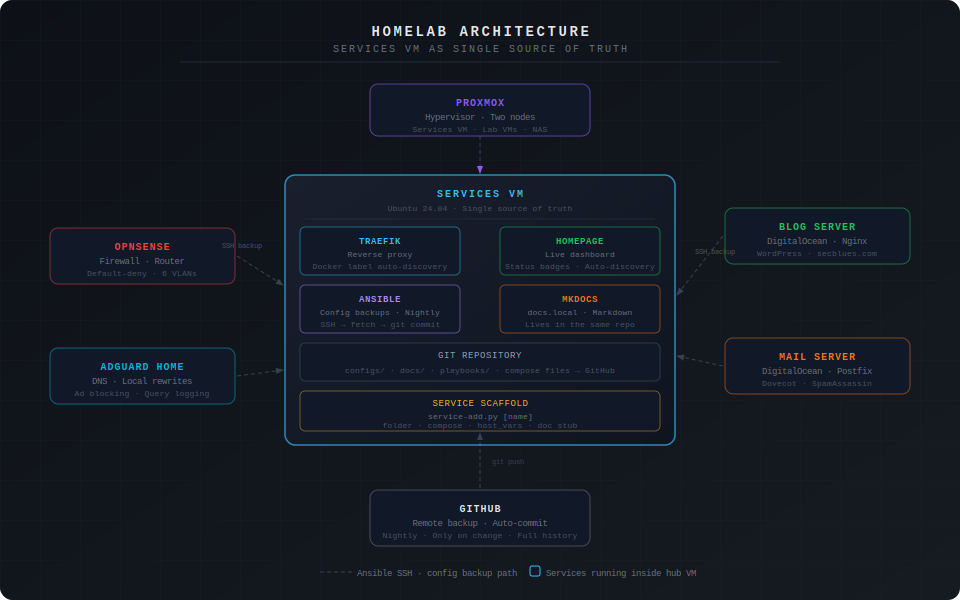
The biggest quality-of-life improvement was getting Traefik and Homepage to automatically pick up new containers via Docker labels. No more manually editing reverse proxy configs or dashboard entries every time you spin up a new service.
When you deploy a new container, you add labels like this to the compose file:
labels:
  # Tell Traefik to route this service
  - "traefik.enable=true"
  - "traefik.http.routers.[service-name].rule=Host(`[service-name].[your-domain].local`)"
  - "traefik.http.routers.[service-name].entrypoints=web"
  - "traefik.http.services.[service-name].loadbalancer.server.port=[container-port]"

  # Tell Homepage to show this service on the dashboard
  - "homepage.group=[Dashboard Group Name]"
  - "homepage.name=[Display Name]"
  - "homepage.href=http://[service-name].[your-domain].local"
  - "homepage.description=[Short description]"
  - "homepage.icon=[service-name].png"
Start the container and within seconds it appears on the dashboard with a live status badge, and [service-name].[your-domain].local routes to it through Traefik. No config editing required.
One gotcha worth mentioning: Homepage reads the Docker socket to discover containers, and it needs to run with a group ID that has permission to access that socket. If you see EACCES /var/run/docker.sock in the Homepage logs, check the GID of your docker group (getent group docker) and make sure the PGID environment variable in your Homepage compose file matches it. This will silently blank your entire dashboard and the logs are the only way to know why.
The backup system uses Ansible’s fetch module to pull config files from every host and store them in the Git repo. What makes it scale cleanly is a metadata-driven approach: instead of hardcoding paths in the playbook, each host has a host_vars file that lists what to back up.
# infrastructure/ansible/inventory/host_vars/[hostname].yml

ansible_host: [host-ip]
ansible_user: [ssh-user]
ansible_ssh_private_key_file: ~/.ssh/[your-key]

config_paths:
  - /etc/[service]/[config-file]
  - /etc/[service]/[another-config]
The playbook itself never needs to change:
- name: Fetch config files
  fetch:
    src: "{{ item }}"
    dest: "~/[repo]/configs/{{ inventory_hostname }}/"
    flat: yes
  loop: "{{ config_paths }}"
  when: config_paths is defined
Adding a new host to backups means adding a host_vars file with the right paths. That’s the whole change. The playbook runs nightly via cron and only commits to GitHub if something actually changed — no noise in the commit history.
# Cron entry — runs at 2am nightly
0 2 * * * cd ~/[repo] && ansible-playbook \
  -i infrastructure/ansible/inventory/hosts.yml \
  infrastructure/ansible/playbooks/backup-configs.yml && \
  git add configs/ && git diff --cached --quiet || \
  git commit -m "Auto backup $(date +%Y-%m-%d)" && git push
This approach works across mixed environments without any changes to the playbook — local VMs, cloud servers, whatever. As long as you can SSH to it, Ansible can back it up.

Deploying a new service used to mean copying a compose file, editing names and ports, creating the folder structure, adding a host_vars entry, and creating a doc stub — all manually and all prone to inconsistency. I replaced that with a Python script.
python3 ~/[repo]/automation/tools/service-add.py [service-name] --vlan [vlan]
One command creates:
services/[vlan]/[service]/config/ and data/docs/Services/The compose file still needs manual edits for the correct image, port, and any service-specific config. But the skeleton is always consistent, the labels are always right, and you’re not starting from scratch or copy-pasting from another service and forgetting to update a name somewhere.
The script itself is straightforward Python — mostly file I/O, string replacement, and pathlib for directory creation. If you’re learning Python and want a practical first project, something like this is a good place to start. The concepts are simple and the payoff is immediate.
The documentation problem is one I’ve seen people solve in a lot of ways, most of which fail because they require too much manual effort to maintain. Writing docs in a separate system that lives outside your infrastructure repo is a good way to ensure they’re always stale.
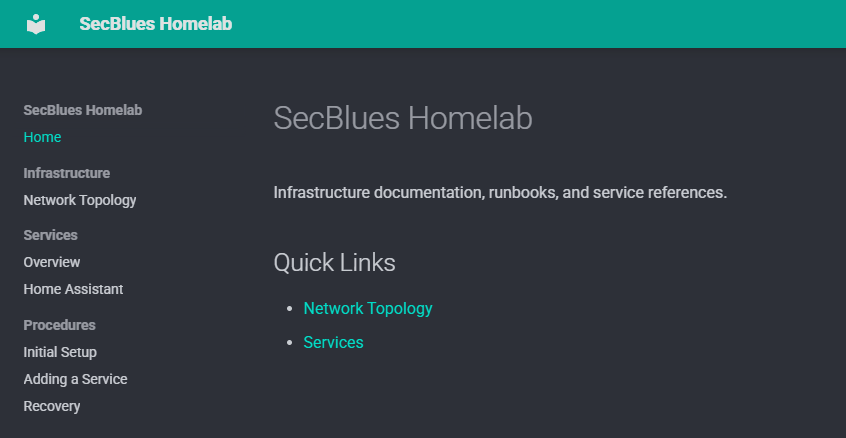
The approach here: everything is markdown in the same repo. MkDocs renders it into a browsable site at docs.[your-domain].local. Because the docs live next to the configs and compose files, there’s at least a fighting chance of updating them when something changes.
The structure that’s worked well:
docs/
├── index.md
├── Infrastructure/
│   └── Network Topology.md     # Network diagram, VLAN table, host inventory
├── Services/
│   └── [Service Name].md       # One file per service, generated by scaffold script
└── Procedures/
    ├── Initial Setup.md        # How to rebuild from scratch
    ├── Adding a Service.md     # End-to-end deployment workflow
    └── Recovery.md             # What to do when things break
The Recovery doc is the one I’d tell people to write first. It forces you to think through failure scenarios before they happen, and “what would I do if this VM died right now” is a question worth having an answer to before you actually need it.
A few things worth calling out specifically if you’re coming at this from a security background:
Credentials don’t go in the repo. The GitHub token lives in [your password manager]. SSH private keys live on disk and in [your password manager] as a backup — never committed. Any config files containing secrets (database passwords, API keys) are explicitly gitignored before the backup runs.
The Ansible key is scoped. There’s a dedicated SSH key for Ansible automation, separate from your personal keys. If it’s ever compromised, you revoke it without touching anything else. It’s generated with ed25519 and stored in [your password manager].
AdGuard sits between clients and DNS. All local DNS rewrites run through AdGuard Home, which also handles ad/tracker blocking and query logging. That means you have visibility into what’s resolving what — useful for catching unexpected outbound connections from IoT devices or compromised systems.
VLAN segmentation limits blast radius. The Services VM lives in the management LAN. IoT devices, guest devices, and lab VMs are on separate VLANs with default-deny firewall rules. A compromised IoT device can’t reach the management network without explicitly punching through the firewall.
None of this is groundbreaking security, but it’s the difference between a homelab that’s a liability and one that’s reasonably hardened for a home environment.
Start with the scaffold script earlier. The inconsistency that builds up from manually creating service folders over months is real. Having a standard structure from day one makes everything downstream — backups, documentation, troubleshooting — cleaner.
Write the Recovery doc while you’re building. I wrote mine after the fact and had to fill in gaps from memory. Writing it during the build means it’s accurate and you catch assumptions you didn’t know you were making.
The metadata-driven backup approach is worth the upfront design time. The temptation is to hardcode paths in the playbook and move on. That works until you have 15 hosts, at which point you’re editing a monolithic file instead of dropping in a new host_vars entry.
Don’t underestimate the DNS rewrite step. Every new service needs a local DNS entry pointing the hostname to the Services VM. It sounds obvious but it’s easy to forget mid-deployment and then spend time wondering why Traefik routing isn’t working.
| Component | Tool | Why |
|---|---|---|
| Containerization | Docker + Compose | Standard, portable, easy to rebuild |
| Reverse proxy | Traefik | Auto-discovers containers via Docker labels |
| Dashboard | Homepage | Same label-based auto-discovery, live status |
| Config backups | Ansible + Git | Agentless, works across mixed environments |
| Documentation | MkDocs + Material | Markdown in the repo, always accessible |
| Service scaffolding | Python script | Consistent structure, no manual templating |
| Secrets | [Your password manager] | Never in the repo |
The whole thing cost about a weekend of setup time. Ongoing maintenance overhead is close to zero — Ansible runs itself, the dashboard updates itself, and new services slot in with one command. That’s about the best you can do without going full Kubernetes, which is almost certainly overkill for a homelab.